
release 1.06
YTS ETH Packet Generator
Master your network traffic. A powerful Windows desktop tool for crafting, transmitting and monitoring custom Ethernet packets — built for network engineers, security researchers and QA teams.
YTS ETH Packet Generator
The YTS Packet Generator is a powerful and easy-to-use desktop tool designed for Windows PCs, allowing users to generate and monitor custom Ethernet traffic for testing and diagnostics purposes.
Whether you’re validating network infrastructure, stress-testing switches and routers, researching protocol behavior, or running educational lab exercises — the Packet Generator gives you precise control over every field of every packet, at any transmission rate you choose.
Key Features
Full Header Control — Layer 2
Configure every field of the Ethernet frame: Source MAC, Destination MAC, EtherType, and VLAN tags. Full 802.1Q VLAN support included.
IPv4 Header Control — Layer 3 Layer 3
Configure Source IP, Destination IP, protocol fields and IPv4 header options. Craft packets at the network layer for IP-level testing and research.
UDP / TCP / ICMP Support
Full transport layer header control. Set source/destination ports, flags, sequence numbers and checksum fields across all major protocols.
Fixed & Random Packet Sizes
Choose exact packet sizes or let the generator randomize within a defined range, simulating real-world traffic diversity across all tests.
Continuous & Burst Transmission
Run continuous streams or defined bursts at custom bit rates. Precise bitrate control lets you simulate exact bandwidth loads on your network.
Real-Time Traffic Monitor
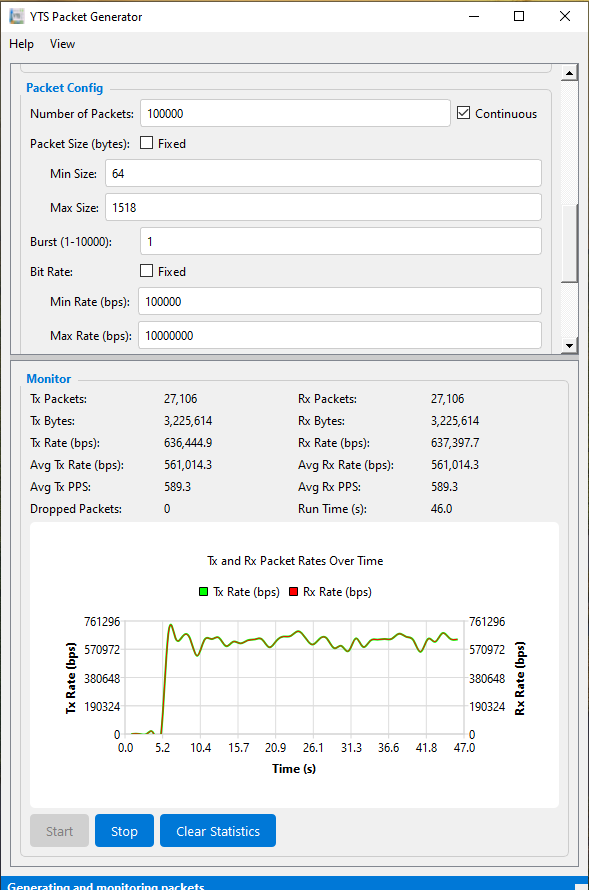
Live Tx/Rx packet counters, byte counts, rates and dropped packet tracking. A graphical Tx/Rx rate-over-time chart updates in real time during every test run.
Hex Editor for Payload
Inspect and manually craft packet payloads at the byte level using the built-in hex editor. Ideal for precise protocol testing and security research.
Interface Selection flexible
Choose any available Windows network adapter — physical or virtual. Works with all Ethernet interfaces including VMware and Hyper-V virtual adapters.
Select your network interface
Choose the Windows adapter you want to transmit from. Any Ethernet interface is supported, including virtual adapters.
Configure Ethernet & IP headers
Set your Source/Destination MAC, EtherType, VLAN settings, IPv4 Source/Destination IP, and transport layer protocol fields.
Set packet size and transmission rate
Choose fixed or random packet sizes and define your target bit rate for continuous or burst transmission mode.
Start and monitor live results
Hit Start. Watch the real-time Tx/Rx monitor with packet counts, byte rates, and the graphical throughput chart update as packets fly.
See it in action
The YTS Packet Generator in use — header configuration, packet crafting, and the live real-time monitor with Tx/Rx throughput graph.

Download YTS ETH Packet Generator
Free for Windows — no license key, no registration, no expiry. Download and start crafting custom Ethernet traffic in minutes.
🔒 No malware · No bundled software · No ads
Technical specifications
| System Requirements | |
|---|---|
| Operating System | Windows 10 / 11 |
| Architecture | x64 |
| RAM | 4 GB minimum |
| Network Interface | Any Ethernet adapter |
| Virtual Adapters | VMware, Hyper-V, VirtualBox |
| License | Free — no key required |
| Protocol & Header Support | |
|---|---|
| Ethernet II (Layer 2) | ✓ Full control |
| 802.1Q VLAN Tagging | ✓ Supported |
| IPv4 (Layer 3) | ✓ Full control |
| UDP Header | ✓ Supported |
| TCP Header | ✓ Supported |
| ICMP | ✓ Supported |
| Custom Payload / Hex | ✓ Hex editor |
| Packet Size | Fixed or random range |
| Transmission Mode | Continuous or burst |
| Bitrate Control | Custom rate (bps) |
| Real-time Monitoring | ✓ Tx/Rx graph |
Who uses the Packet Generator?
Security Researchers
Craft malformed or non-standard frames to probe device behavior, validate firewall rules, and test IDS/IPS responses at Layer 2 and 3.
Network Engineers
Stress-test switches, routers and links with precise traffic loads. Verify QoS policies, bandwidth limits and storm-control configurations.
QA & Test Teams
Generate repeatable, deterministic traffic profiles for automated hardware and software testing — identical test conditions every run.
Students & Educators
Run hands-on networking labs. Observe how real Ethernet frames are structured, sent and received — bringing protocol theory to life.