
release 1.09
YTS Serial Traffic Generator
Test, debug and monitor your serial communication ports. A powerful Windows desktop tool for generating custom serial traffic, measuring throughput, injecting errors and verifying COM port hardware — built for engineers working with RS-232 and RS-485 devices.

YTS Serial Traffic Generator
The YTS Serial Traffic Generator is an easy-to-use desktop tool designed for Windows PCs, allowing users to generate and monitor traffic over serial ports for testing and diagnostics purposes.
Whether you’re validating a PLC, debugging an embedded controller, stress-testing RS-485 links, or simply verifying that a COM port works before connecting hardware — this tool gives you the precision and visibility you need in one compact application.
Key Features
Comprehensive Serial Port Configuration
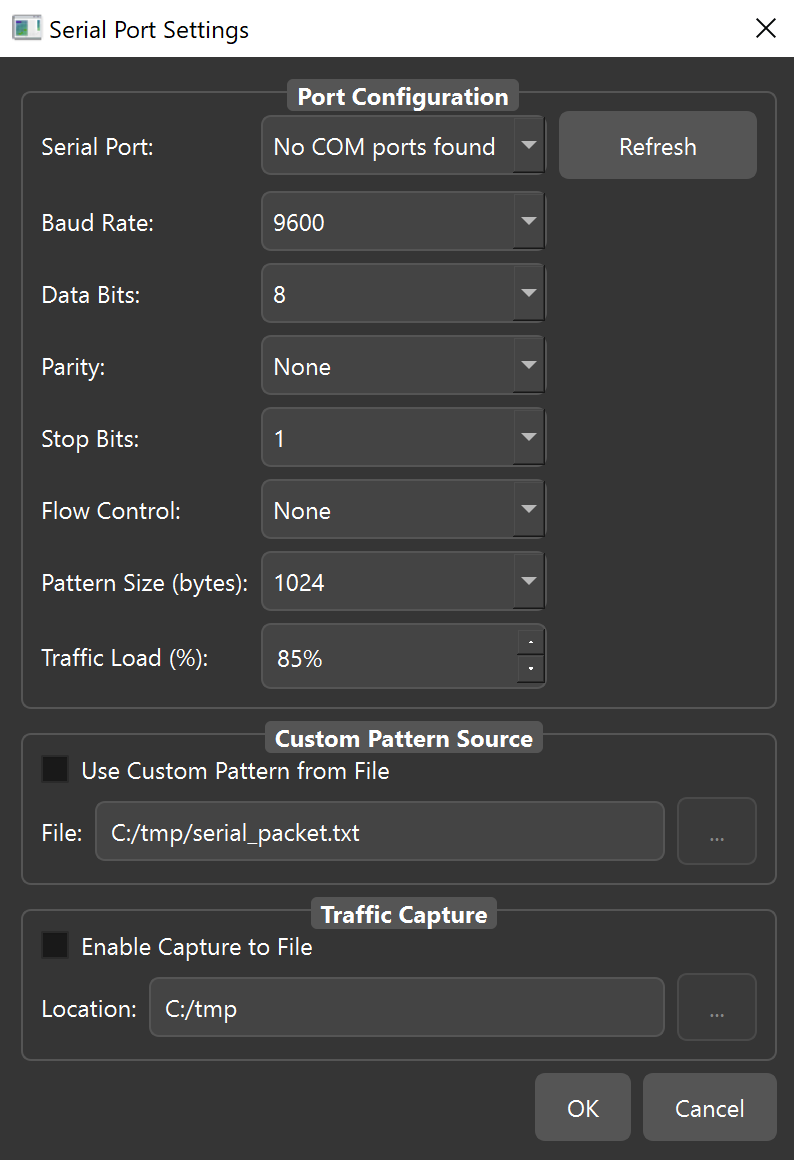
Easily set up all critical parameters — baud rate, data bits, stop bits, and parity — to precisely match your device’s communication requirements.
Pattern Generation & Transmission new
Generate and transmit customizable data patterns ranging from 64 to 32,768 bytes, simulating real-world serial traffic scenarios with full payload control.
Custom Pattern Generator new
Define your own byte-level transmission patterns. Create specific data sequences that match your device’s expected input for precise protocol validation.
Real-Time Throughput Monitoring
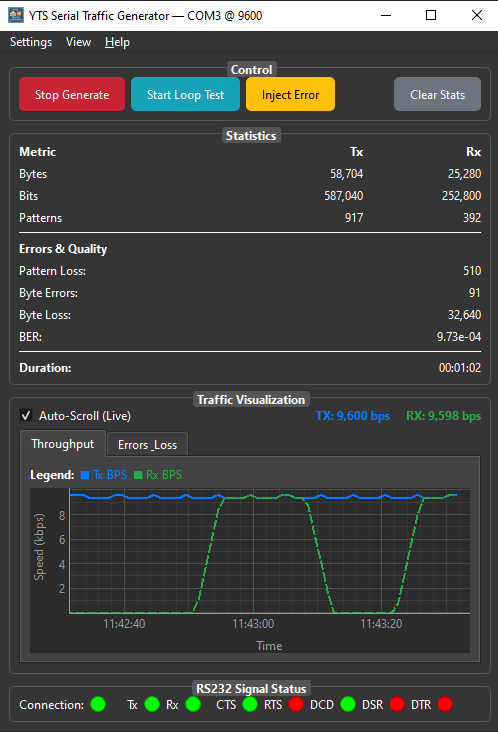
Visualize your data flow with a dynamic, real-time graph displaying both Transmit (Tx) and Receive (Rx) Bits Per Second (BPS) — updated live during every test run.
Error Injection Capabilities
Intentionally introduce bit-level errors into transmitted patterns to rigorously test the error handling and robustness of your receiving device under fault conditions.
Detailed Statistics & Error Reporting
Get immediate feedback on transmitted/received bytes and bits, pattern counts, and critical error metrics like byte errors and pattern loss — enabling quick diagnosis of communication issues.
Serial Loopback Test Mode
Perform internal loopback tests to verify the functionality of your serial port itself, ensuring your hardware is working correctly before connecting to external devices. Perfect for a quick sanity check on any COM port.
Comparator Tool
Post-capture TX / RX analysis & visual diff
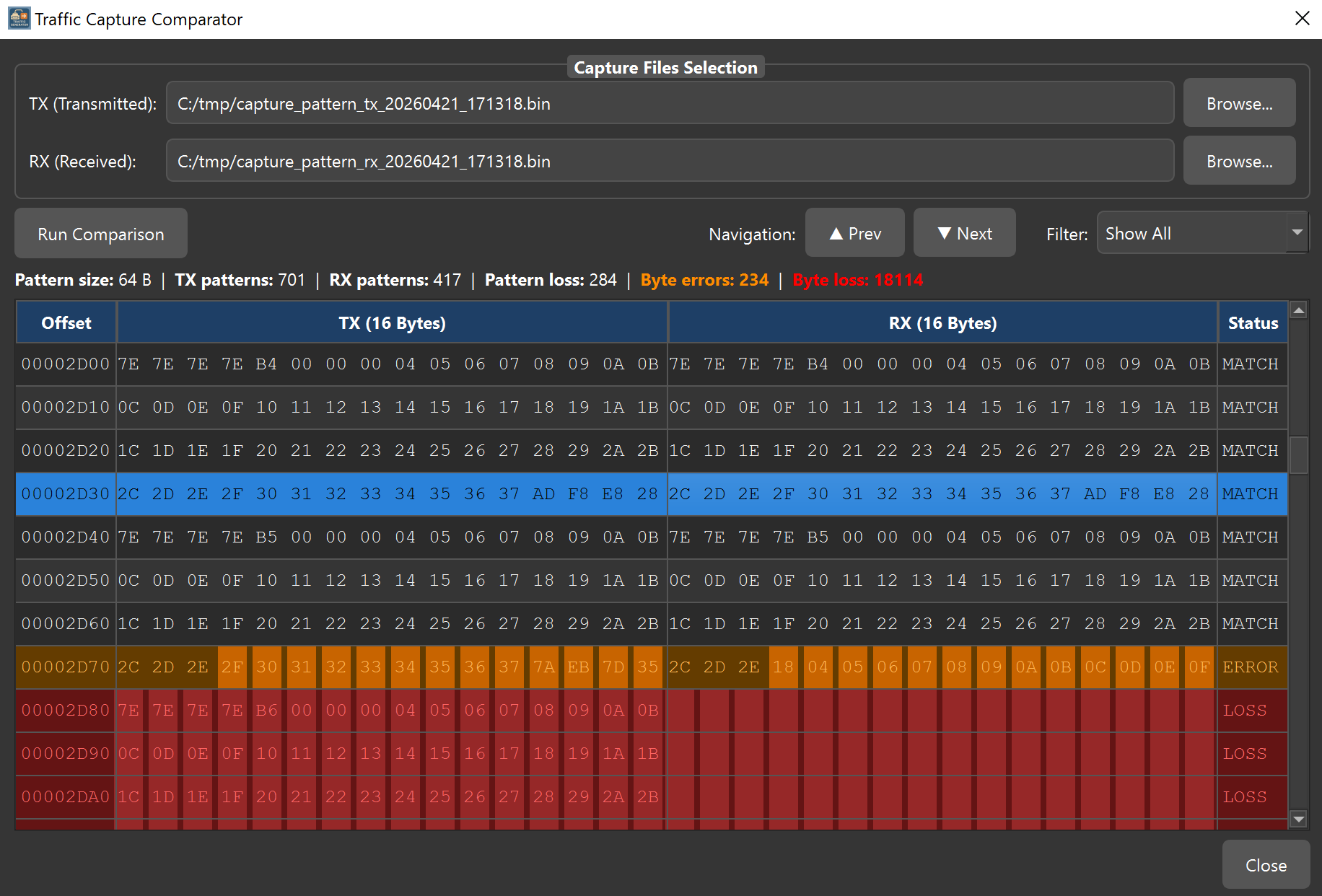
The built-in Comparator lets you load saved TX and RX captures and perform a deep byte-level analysis — pinpointing exactly where data was corrupted or lost, even across multi-megabyte files. Sequence-number–based alignment means you get accurate results even when the RX file begins mid-stream or contains large gaps in the data.
Smart Alignment
Uses embedded sequence numbers to line up TX and RX captures even when the RX file starts mid-stream or contains large gaps.
Byte-by-Byte Visual Diff
Differences are highlighted inline — orange for corrupted bytes, red for lost regions — giving you an instant picture of where errors occurred.
Error Region Navigation
Next / Prev buttons jump directly between error regions in multi-megabyte captures, so you never have to scroll manually to find the next fault.
See it in action
The YTS Serial Traffic Generator interface — main traffic view, port configuration panel, and real-time monitoring.
Download YTS Serial Traffic Generator
Free for Windows — no license key, no registration, no expiry. Download and start testing your serial ports in minutes.
🔒 No malware · No bundled software · No ads
Technical specifications
| System Requirements | |
|---|---|
| Operating System | Windows 10 / 11 |
| Architecture | x64 |
| RAM | 4 GB minimum |
| COM Port | Any RS-232 / RS-485 port |
| Virtual COM Ports | Supported |
| License | Free — no key required |
| Feature Support | |
|---|---|
| RS-232 Interface | ✓ Supported |
| RS-485 Interface | ✓ Supported |
| Baud Rate | Fully configurable |
| Data Bits | 5, 6, 7, 8 |
| Stop Bits | 1, 1.5, 2 |
| Parity | None, Even, Odd, Mark, Space |
| Pattern Size | 64 – 32,768 bytes |
| Custom Patterns | ✓ New |
| Error Injection | ✓ Bit-level |
| Loopback Test | ✓ Built-in |
| Real-Time Monitor | ✓ Tx/Rx BPS graph |
| Error Reporting | ✓ Byte & pattern errors |
Who uses the Serial Traffic Generator?
Industrial Engineers
Test PLCs, HMIs, and industrial controllers over RS-485. Verify that your serial bus handles real-world traffic loads reliably before deployment.
Embedded Developers
Validate firmware serial drivers. Inject errors to verify error recovery logic and confirm that your embedded system handles communication failures gracefully.
Field Service Technicians
Quickly verify COM port health on site before connecting sensitive equipment. The loopback test confirms port functionality in under a minute.
Students & Educators
Observe serial communication parameters in action. Understand how baud rate, parity, and data bits affect real data transmission through hands-on experimentation.