
★★★★★
Terminal Manager: Your All-in-One Remote Management Solution
Consolidate all your remote access tools into a single, streamlined interface
release 1.09
YTS Terminal Manager
The YTS Terminal Manager is an advanced, all-in-one terminal management solution built specifically for Windows PCs. Designed for network engineers, system administrators, developers, and power users, this tool provides robust support for a wide range of communication protocols and terminal types—all in a single, easy-to-use desktop application.
Key Features
1
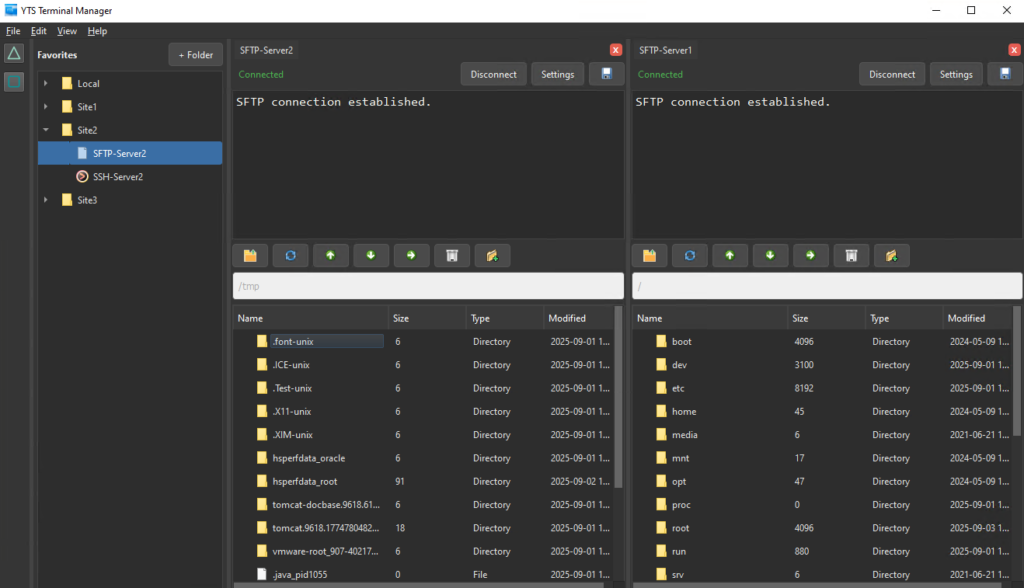
SSH, Telnet, SCP, SFTP, FTP Clients
2
Serial port support
3
PowerShell Integration
4
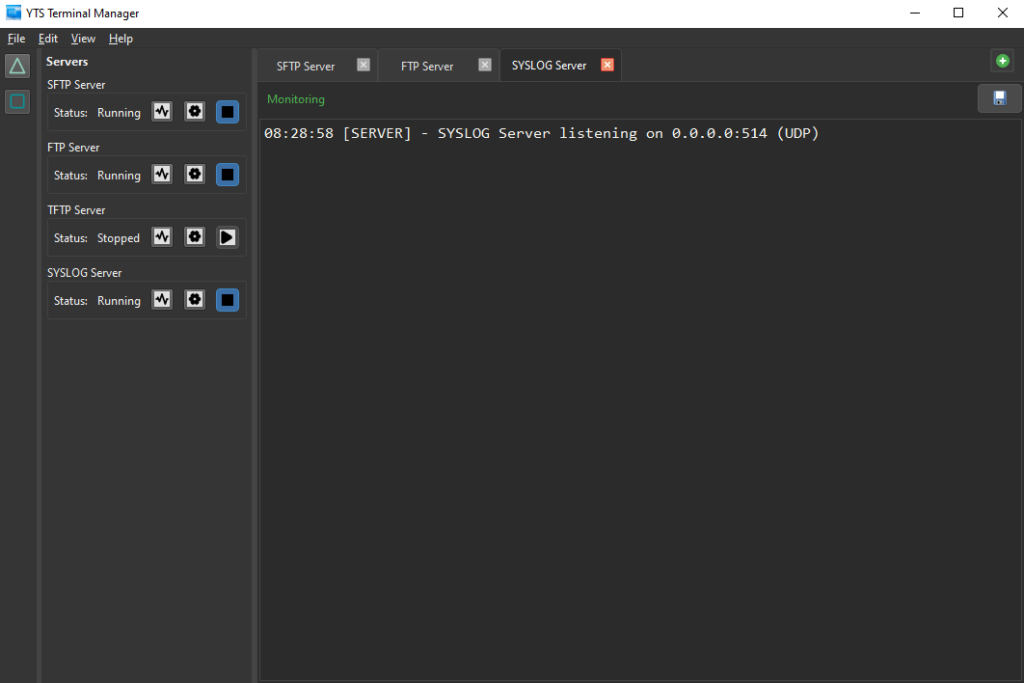
Embedded FTP, SFTP, TFTP, TACACS Plus and SYSLOG Servers
5
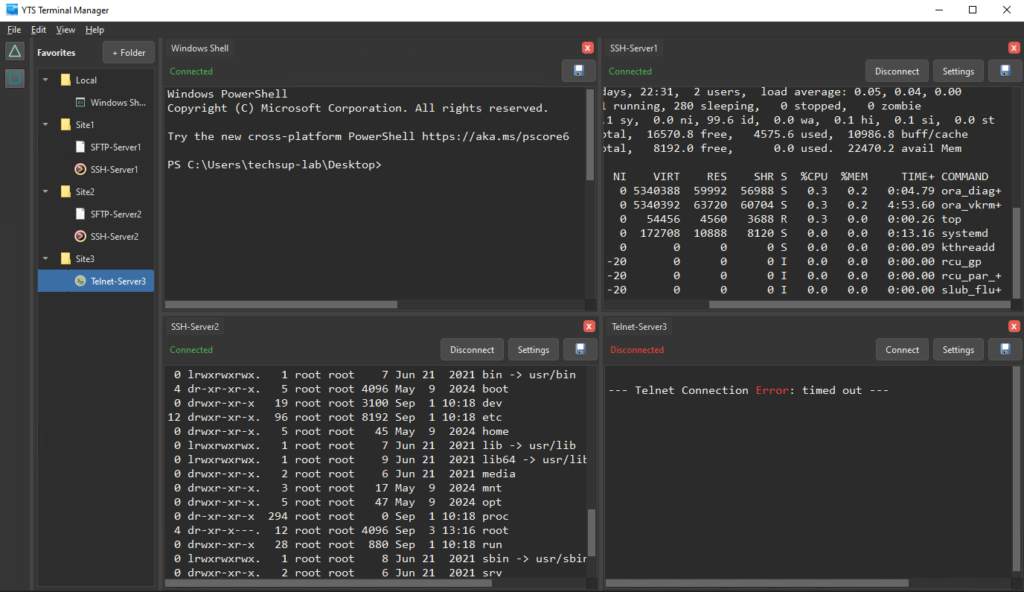
Multi-view layout modes
6
Command Sharing

Release Note
Release 1.0.9 – February 21, 2026
New Features:
- Embedded Python API Integration
Introduced an embedded Python API that allows users to execute Python scripts directly from within the application. This enables powerful automation, scripting, and advanced customization without leaving the app environment.
- Keyboard Shortcuts for Python Execution
Added dedicated shortcut keys to quickly run Python scripts, improving workflow speed and developer productivity..
- Automatic Session Logging
Implemented automatic session logging to capture activity and execution details for troubleshooting, auditing, and better traceability.
- Launch PowerShell and CMD with Arguments
Users can now launch PowerShell and Command Prompt directly from the application with predefined command-line arguments, enabling faster task automation and environment setup.
Fixes & Improvements:
- Improved PowerShell History Handling
Enhanced PowerShell history behavior for better command tracking and a smoother user experience.
- Ctrl + F Search Shortcut
Added support for Ctrl + F to quickly launch the search functionality within the application. - Light Mode Menu Highlighting
Improved highlight visibility in Light Mode menus for clearer navigation and better visual feedback - Large Text Copy & Paste Stability
Resolved issues when copying and pasting large amounts of text, improving reliability and performance.
Release 1.0.8 – December 28, 2025
New Features:
- IPv6 Support in Subnet Calculator
Extended the Subnet Calculator to fully support IPv6 networks, allowing calculation of prefix ranges, usable addresses, and subnet boundaries for both IPv4 and IPv6.
- Keyboard Shortcuts for Tab Navigation
Added new keyboard shortcuts — Ctrl + Tab and Ctrl + Shift + Tab — to quickly switch between open tabs and improve workflow efficiency.
- Improved UI Visibility
Enhanced user interface visibility across the application with clearer contrast, refined iconography, and optimized text legibility for better usability in all display modes.
Fixes & Improvements:
- Sidebar Multiview Launch Issue Resolved
Fixed an issue where sidebar apps would not open when the view mode was set to Multiview, ensuring reliable access to all sidebar tools.
Release 1.0.7 – December 27, 2025
New Features:
- IP / Port Scanner Tool
Added a built-in IP and Port Scanner, allowing quick discovery of reachable hosts and open TCP/UDP ports directly from the application.
- SNMP Walk Tool
Added SNMP Walk support for querying and displaying SNMP OID trees from network devices, enabling detailed inspection and troubleshooting.
- Network Diagnostics Tools
Introduced a Network Diagnostics module, including:- Ping Latency Test for measuring reachability and response times
- Traceroute for visualizing network paths and identifying routing issues
- Wake-on-LAN Tool
Added Wake-on-LAN functionality, enabling remote power-on of supported devices using MAC address targeting.
- Subnet Calculator Tool
Added an integrated Subnet Calculator for calculating subnet masks, network ranges, broadcast addresses, and usable IP ranges.
Release 1.0.6 – December 1, 2025
New Features:
- Customizable Terminal GUI
Added full customization options for the terminal view, including adjustable font size, selectable color themes, and the ability to highlight text in multiple colors.
Fixes & Improvements:
- Expanded History Buffer
Increased terminal scrollback history from 2,000 to 200,000 lines, allowing long sessions and heavy command outputs to be fully retained. - Terminal Performance Enhancements
Optimized the VT100 rendering engine for significantly smoother performance, especially during high-output operations or large log streams. - SFTP Server Improvements
- Added support for legacy SFTP algorithms for improved compatibility with older clients.
- Fixed issues affecting multi-file downloads, ensuring fully reliable and stable SFTP transfer sessions.
- Improved internal logging and error reporting for better diagnostics during file transfer failures.
Release 1.0.5 – November 11, 2025
New Features:
- SSH X11 Forwarding
Added support for X11 forwarding in SSH connections, enabling graphical applications to be run remotely and displayed locally
Fixes & Improvements:
- Performance optimizations: Major improvements to handling large volumes of data in open connections. Running many lines of output is now smooth and responsive, eliminating previous slowdowns.
Release 1.0.4 – October 25, 2025
New Features:
- Windows CMD Integration
Added native support for running Windows Command Prompt sessions directly within the app.
- RDP Integration
You can now launch Remote Desktop (RDP) sessions directly from within the application—no need to open external tools.
- Search Functionality
Introduced a powerful search tool that lets you search text in the active connection or across all open connections.
Results are highlighted for easy navigation.
- Command Sharing
Added the ability to broadcast commands to all open connections that share the same group number—perfect for managing multiple hosts simultaneously.
- Close All Connections
New option to close all open sessions at once for faster workspace cleanup.
Fixes & Improvements:
- Fixed several copy and paste issues affecting text selection and formatting in terminal sessions.
- Resolved a bug in the recording feature where session output was not captured correctly in some cases.
- General performance and stability improvements across all session types.
Release 1.0.3 – September 30, 2025
New Features
- TACACS+ Server
Added built-in TACACS+ authentication server support, enabling secure centralized user management and device access control.
Fixes & Improvements
- Scroll Buffer – Fixed a bug that caused terminal history or scrollback content to behave inconsistently during long sessions.
- SSH Client – Added support for legacy encryption algorithms, improving compatibility with older network devices.
Release 1.0.2 – September 10, 2025
New Features
- TFTP Server
Added a built-in TFTP server for lightweight file transfers—ideal for network device configuration backups and firmware updates
- SYSLOG Server
Introduced an integrated SYSLOG server, allowing you to collect, view, and manage system logs directly within the application.
Release 1.0.1 – June 16, 2025
New Features
- Terminal Clients
Introduced built-in support for multiple connection types, including Telnet, SSH, SCP, SFTP, and FTP.
- PowerShell Integration
Added full integration with Windows PowerShell, enabling native command execution within the app.
- Serial Port Connections
Support for serial communication added—ideal for managing hardware devices and embedded systems.
- Servers
Included built-in SFTP and FTP servers for easy file sharing and management.
- Multi-View Interface
Added a flexible multi-tab and multi-view layout, allowing you to open and manage multiple connections simultaneously.